Medhā Computing
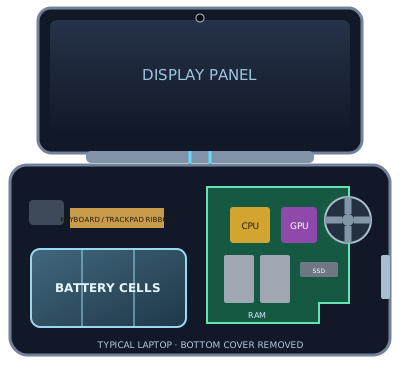
Inside a Laptop! 💻🔍
Hover over the components of the Screen and the Base to uncover their secrets!
Select a component 🔍
👋 Welcome to Laptop Anatomy!
We've taken an X-Ray of the laptop! On the left is the screen lid. On the right, you can see the translucent keyboard floating right over the massive high-tech engine room underneath. Click around!
⚡ OVERCLOCK MODE ACTIVATED!
Maximum processing power engaged! The fans are spinning up and the laptop is working at lightning speed!
📺 Display Panel
A beautiful high-resolution screen made of millions of tiny lights to show your games, code, and movies perfectly.
📷 HD Webcam
A tiny high-definition camera built right into the top bezel so you can join video calls or stream your games.
🎙️ Array Microphones
Multiple tiny microphones spaced apart. They work together to hear your voice clearly while ignoring background noise like clicking keyboards!
🛡️ Lid Bezel & Chassis
The tough outer frame that protects the fragile glass screen from bending and snapping in your backpack.
⌨️ Keyboard & Trackpad
The input grid! It senses the electrical connections when your fingers press the keys or swipe the pad, sending those commands straight to the CPU.
⏻ Power Button
The master switch! When you press it, it tells the motherboard to wake up the battery and start the entire boot sequence.
💻 Aluminum Base
The heavy bottom case of the laptop. It acts as armor, keeping all the expensive chips safe while also helping absorb heat.
🧩 Motherboard
The giant electronic city grid! Every single component plugs into this board so they can send electricity and data to each other.
🧠 CPU (Processor)
The main brain of the computer. It handles all the logic, math, and instructions required to open apps and run the operating system.
🎮 GPU (Graphics Card)
The muscle! This special chip calculates insanely complex 3D math to draw video game graphics and render videos super fast.
🚀 RAM (Memory)
The computer's short-term workbench. It temporarily holds the apps and tabs you have open RIGHT NOW so the CPU can reach them instantly.
💾 NVMe SSD (Storage)
The digital vault. A super-fast flash drive where your operating system, downloaded games, and files are saved permanently.
🔋 99Wh Li-Po Battery
A massive array of lithium-polymer cells. Laptops need HUGE batteries because big screens and powerful CPUs drink a lot of electricity.
❄️ Fans & Copper Heatpipes
CPUs and GPUs get burning hot! The orange copper pipes suck the heat away, and the spinning fans blast the hot air out the back vents.
🔊 Stereo Speakers
Large vibrating magnets located on the left and right sides to give you loud, immersive stereo sound for movies and games.
⚡ Charging Port
The high-voltage gate! It funnels raw power from the wall socket straight into the battery and the motherboard.
🔱 USB Ports
The universal connectors! These ports allow you to plug in your mouse, flash drives, external keyboards, and phones.
📺 HDMI Port
The video pipeline! It blasts millions of pixels from the GPU out to external monitors, TVs, and projectors.
🎧 Headphone Jack
The 3.5mm analog gate! It takes electrical sound waves from the motherboard and sends them straight into your wired headphones.
Laptop Physiology 💭⚡
How does a laptop actually work? Click any of the 10 actions below to watch data and electricity flow through the system!